Contents
What Is a VPN? How It Works and Which Network Layer It Uses
A plain-English explanation of how a VPN works — the encrypted tunnel, which network layer it operates at, how virtual network adapters capture your traffic, and what a VPN can and can't protect you from.
How networks work — series: ① What happens when you open a website → ② Network layers → ③ Common network protocols → ④ What is a proxy? → ⑤ What is a VPN? → ⑥ VPN vs proxy → ⑦ What HTTPS encrypts → ⑧ System proxy vs TUN mode → ⑨ Split tunneling → ⑩ DNS poisoning and leaks → ⑪ Why it slows down at night → ⑫ Latency, loss and bandwidth
A VPN (virtual private network) builds an encrypted private tunnel across a public network — your home broadband, a café’s Wi-Fi, your mobile data. Your device encrypts and wraps everything it sends, ships it to a VPN server you trust, and the server unwraps it and makes the request on your behalf. Every ISP and router along the way just sees “an encrypted stream between this device and that server” — not the contents, and not where you’re ultimately going.
Think of normal browsing as mailing postcards: anyone who handles them can read the message and the address. A VPN puts all your mail in a locked box, sends the box to a forwarding office you trust, and has them post each letter from there.
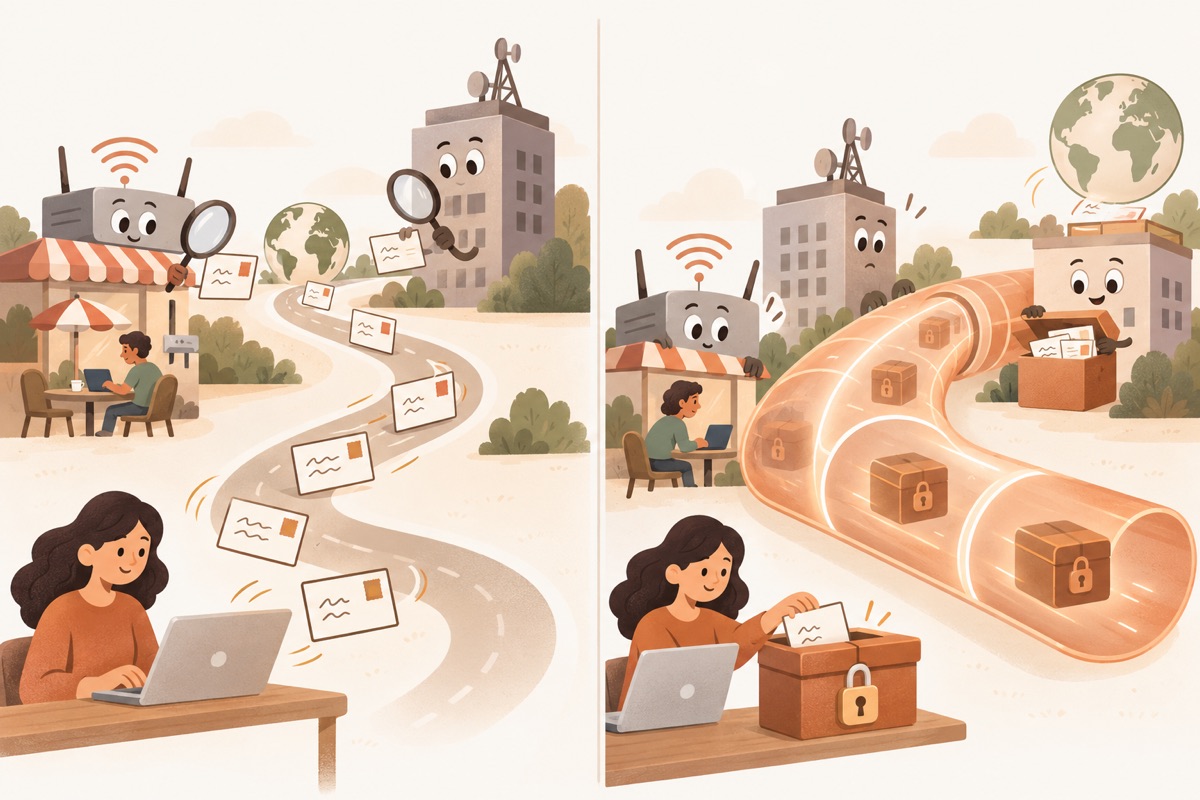
- ① Plain textPostcards travel open — anyone can read them
- ② OnlookersOthers on the Wi-Fi and the ISP can see it all
- ③ EncryptionThe letter is locked in a box — only the two ends have keys
- ④ Encrypted tunnelOnlookers only see a sealed pipe
- ⑤ VPN serverUnlocks the box and forwards the letter for you
Normal browsing vs. browsing through a VPN
Which network layer does a VPN work at?
Networking is built in layers: physical cables and radio at the bottom, then the network layer (IP) that decides which machine gets a packet, the transport layer (TCP / UDP) that decides which program gets it, and apps like web pages and video on top. When people say a VPN “works at layer X”, they usually mean which layer’s data it wraps up whole:
| Layer | What gets wrapped | Common technologies | Typical use |
|---|---|---|---|
| Layer 2 (data link) | Entire Ethernet frames, MAC addresses and all | L2TP, Ethernet tunnels | Joining two offices into one “local” network |
| Layer 3 (network) | Entire IP packets | IPsec, WireGuard | Site-to-site links, whole-device VPNs |
| Layers 4–7 (TLS-based) | Traffic carried inside a TLS connection | OpenVPN, SSL VPNs | Remote work, networks that only allow web traffic |
The lower the layer, the more a tunnel can carry. TLS-based tunnels sit higher up, but because they look a lot like ordinary HTTPS, they still work on networks that only let web traffic through.
Virtual network adapters: how traffic gets into the tunnel
A tunnel alone isn’t enough — every app’s traffic has to actually go into it. Modern VPN apps do this with a virtual network adapter provided by the operating system:
- TUN — a layer 3 virtual adapter that sends and receives IP packets. The VPN app points the system’s default route at it, so every packet any app sends lands on this “adapter” first. The VPN app reads it, encrypts it and sends it out through your real network card to the VPN server;
- TAP — a layer 2 virtual adapter that handles Ethernet frames, mainly used where local-network broadcasts are needed.
Because a virtual adapter reroutes the whole device, every operating system asks you to approve it: iPhone and Mac show an “Add VPN Configurations” prompt, Android shows a “Connection request”, and Windows needs administrator permission. That’s why you see a system prompt the first time you connect.
What happens to a single request, step by step?
Putting it all together, here’s the full round trip when you open an overseas website in your browser:
| Step | Who | What happens |
|---|---|---|
| ① Original request | Browser / app | Sends the request exactly as it normally would — it has no idea the tunnel exists. The system’s routing hands the packet to the virtual adapter |
| ② Encrypt + wrap | VPN app | Reads the packet from the virtual adapter, encrypts the whole thing and wraps it in a new header addressed to the VPN server |
| ③ Encrypted packets | ISP network | Forwards it as usual. It can see that your device is talking to the VPN server, but not what’s inside or which website it’s ultimately for |
| ④ Decrypt + unwrap | VPN server | Decrypts it with the keys the two ends agreed on, recovering the original request |
| ⑤ Forwards request | VPN server | Sends the request to the website from its own IP address — so the site sees the server, not you |
| ⑥ Response | Website | Sends the page back to the VPN server |
| ⑦ Encrypted reply | VPN server | Encrypts and wraps the response and sends it back down the tunnel to your device |
| ⑧ Decrypt + hand back | VPN app | Decrypts it and passes it back through the virtual adapter to your browser, which displays the page |
None of this needs any setup in your browser or apps — encryption and decryption happen only at the two ends: your device and the VPN server.
Why use a VPN?
- Public Wi-Fi isn’t safe: on airport or café Wi-Fi, other people on the network — or whoever runs the hotspot — can see or tamper with unencrypted traffic;
- Less tracking: your ISP can log the sites you visit, and websites and advertisers use your IP address to locate you and link your activity together;
- Reaching services in other regions: many services decide what you can see by your IP address, open only to some countries or offering different content in each;
- Remote work: companies use VPNs to connect staff on the road safely to internal systems.
What a VPN does
| Benefit | What it means |
|---|---|
| Encryption | Everything in the tunnel is encrypted between your device and the VPN server — nobody in between can read it |
| Hides your IP | Websites see the VPN server’s IP address, not yours |
| Changes your location | Your traffic exits from the server’s region, so sites think you’re there |
| Gets around restrictions | Because your exit point moves, you can reach services that block your region or that are restricted on your local network |
What a VPN can’t do
A VPN is useful, but it isn’t magic:
- It doesn’t make you anonymous: once you log in to an account, the site knows who you are. Browser fingerprints and cookies can identify you too;
- It doesn’t stop phishing or malware: fake sites and malicious downloads reach you through the tunnel just as easily. You still need common sense and security software;
- The VPN provider sits in the middle: it can see when you connect and how much data you use, and could in principle see which sites you visit. When choosing one, look for a no-logs commitment and an explanation of how it’s enforced technically.
How Pangolin does it
On iPhone, Mac, Windows and Android, Pangolin uses a TUN virtual adapter to capture all of your device’s traffic, then its Smart mode decides what goes through the tunnel: local sites and apps stay direct, overseas services go through the encrypted tunnel. Our servers don’t record which sites you visit — see Protocol & security and our Privacy policy for the protocol, encryption and no-logs design.
Related reading
FAQ
Will a VPN make my internet faster?
Usually not. Your data takes a detour through the VPN server, and encryption adds a little overhead. The exception is when your normal route is poor — for example congested international links — where a good VPN route can noticeably improve things.
What IP address do websites see when I'm on a VPN?
The VPN server's, not yours. That's why websites think you're in whatever country the server is in.
Sites already use HTTPS — do I still need a VPN?
They protect different things. HTTPS encrypts what you exchange with one website, but your ISP can still see which sites you visit. A VPN wraps all of your device's traffic, so your ISP only sees that you're connected to the VPN server.
Is my work VPN the same thing?
Same technology, different job. A corporate VPN connects employees' computers to the company's internal network; a personal VPN is mostly about privacy and reaching services in other regions.
Don't have Pangolin yet?
Available for iPhone / iPad, Mac, Windows and Android. New accounts get a free 7-day Pro trial.
Download the app